
公告图标
公告:欢迎来到识趣资源,专注分享网站源码,美化教程,实用软件!
UE资源
2026-04-06
密码验证

美化子比主题 – 文章卡片弹窗美化样式(阿呆赞助)

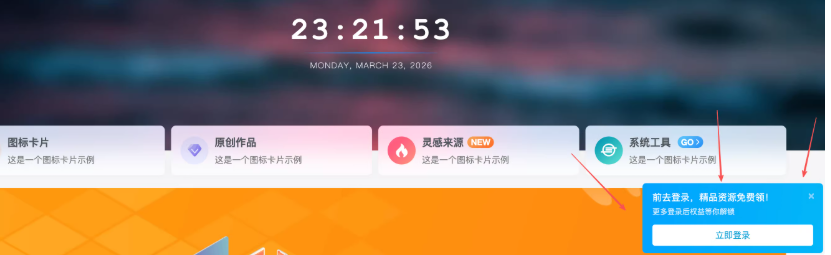
本文介绍了如何美化文章卡片弹窗样式,灵感来源于图酷设计,由阿呆日记原创。通过CSS和JavaScript代码,实现了弹窗背景、容器、关闭按钮、内容、图片、信息、标题和按钮的样式设计。同时,还提供了响应式调整,确保在不同设备上都能良好显示。教程详细介绍了如何将代码应用到后台自定义CSS和JS中,实现个性化的文章卡片弹窗效果。 预览图 [hidecontent type="password" password="ly19960318" img_id="" img_url="" desc=""] 放到后台自定义css .custom-popup-overlay{display:none;position:fixed;top:0;left:0;width:100%;height:100%;background-color:rgba(0,0,0,.45);z-index:9999;justify-content:center;align-items:center}.custom-popup-container{background-color:#fff;border-radius:12px;box-shadow:0 10px 30px rgba(0,0,0,.3);max-width:600px;width:90%;position:relative;overflow:hidden;position:fixed;top:50%;left:50%;transform:translate(-50%,-50%)}.custom-popup-close{position:absolute;top:15px;right:15px;background:rgba(0,0,0,.3);border-radius:50%;width:36px;height:36px;display:flex;justify-content:center;align-items:center;border:none;font-size:20px;cursor:pointer;color:#fff;z-index:10;transition:all .5s ease}.custom-popup-close:hover{background:rgba(0,0,0,.6);transform:rotate(360deg)}.custom-popup-container{background-color:#fff;border-radius:12px;box-shadow:0 10px 30px rgba(0,0,0,.3);max-width:600px;width:90%;position:fixed;top:50%;left:50%;transform:translate(-50%,-50%);overflow:hidden;display:flex;flex-direction:column}.custom-popup-content{display:flex;flex-direction:column;width:100%}.custom-popup-image-container{width:100%;aspect-ratio:16/9;position:relative;overflow:hidden;margin:0!important;padding:0!important}#custom-popup-image{position:absolute!important;top:0!important;left:0!important;width:100%!important;height:100%!important;object-fit:cover!important;margin:0!important;padding:0!important;display:block!important}.dai-soft-popup-waves{position:absolute!important;bottom:-1px!important;left:0!important;width:100%!important;height:15vh!important;min-height:50px!important;max-height:80px!important;z-index:2!important;pointer-events:none!important;margin:0!important;padding:0!important}.custom-popup-info{height:135.75px!important;flex-shrink:0;box-sizing:border-box;padding:15px 30px 20px 30px;display:flex;flex-direction:column;justify-content:center;z-index:3;position:relative;background-color:#fff;margin-top:-1px}#custom-popup-title{font-size:22px;margin-top:0;margin-bottom:18px;color:#333;font-weight:700;line-height:1.4;text-align:center;white-space:nowrap;overflow:hidden;text-overflow:ellipsis}.custom-popup-buttons{display:flex;justify-content:center;gap:12px}.custom-popup-button{min-width:138px;border-radius:8px;padding:10px 18px;font-size:15px;font-weight:600;text-align:center;text-decoration:none;transition:all .3s ease;cursor:pointer;box-sizing:border-box;display:flex;align-items:center;justify-content:center}.left-button{background:linear-gradient(135deg,#fd7a64 10%,#fb2d2d 100%);color:#fff!important;border:none;box-shadow:0 4px 12px rgba(251,45,45,.25)}.right-button{border:1px solid var(--main-border-color,#d8dde5);color:var(--focus-color,#4b5563)!important;box-shadow:none;transition:background-color .2s ease,border-color .2s ease,color...
识趣资源的头像-识趣者资源
至尊会员
识趣资源· 7小时前
2026-03-29
5
2026-03-29
5
2026-03-29
5
2026-03-29
999
2026-03-29
5
2026-03-20
评论可见
2026-03-20
188积分
2026-04-06
密码验证

美化子比主题 – 文章卡片弹窗美化样式(阿呆赞助)

本文介绍了如何美化文章卡片弹窗样式,灵感来源于图酷设计,由阿呆日记原创。通过CSS和JavaScript代码,实现了弹窗背景、容器、关闭按钮、内容、图片、信息、标题和按钮的样式设计。同时,还提供了响应式调整,确保在不同设备上都能良好显示。教程详细介绍了如何将代码应用到后台自定义CSS和JS中,实现个性化的文章卡片弹窗效果。 预览图 [hidecontent type="password" password="ly19960318" img_id="" img_url="" desc=""] 放到后台自定义css .custom-popup-overlay{display:none;position:fixed;top:0;left:0;width:100%;height:100%;background-color:rgba(0,0,0,.45);z-index:9999;justify-content:center;align-items:center}.custom-popup-container{background-color:#fff;border-radius:12px;box-shadow:0 10px 30px rgba(0,0,0,.3);max-width:600px;width:90%;position:relative;overflow:hidden;position:fixed;top:50%;left:50%;transform:translate(-50%,-50%)}.custom-popup-close{position:absolute;top:15px;right:15px;background:rgba(0,0,0,.3);border-radius:50%;width:36px;height:36px;display:flex;justify-content:center;align-items:center;border:none;font-size:20px;cursor:pointer;color:#fff;z-index:10;transition:all .5s ease}.custom-popup-close:hover{background:rgba(0,0,0,.6);transform:rotate(360deg)}.custom-popup-container{background-color:#fff;border-radius:12px;box-shadow:0 10px 30px rgba(0,0,0,.3);max-width:600px;width:90%;position:fixed;top:50%;left:50%;transform:translate(-50%,-50%);overflow:hidden;display:flex;flex-direction:column}.custom-popup-content{display:flex;flex-direction:column;width:100%}.custom-popup-image-container{width:100%;aspect-ratio:16/9;position:relative;overflow:hidden;margin:0!important;padding:0!important}#custom-popup-image{position:absolute!important;top:0!important;left:0!important;width:100%!important;height:100%!important;object-fit:cover!important;margin:0!important;padding:0!important;display:block!important}.dai-soft-popup-waves{position:absolute!important;bottom:-1px!important;left:0!important;width:100%!important;height:15vh!important;min-height:50px!important;max-height:80px!important;z-index:2!important;pointer-events:none!important;margin:0!important;padding:0!important}.custom-popup-info{height:135.75px!important;flex-shrink:0;box-sizing:border-box;padding:15px 30px 20px 30px;display:flex;flex-direction:column;justify-content:center;z-index:3;position:relative;background-color:#fff;margin-top:-1px}#custom-popup-title{font-size:22px;margin-top:0;margin-bottom:18px;color:#333;font-weight:700;line-height:1.4;text-align:center;white-space:nowrap;overflow:hidden;text-overflow:ellipsis}.custom-popup-buttons{display:flex;justify-content:center;gap:12px}.custom-popup-button{min-width:138px;border-radius:8px;padding:10px 18px;font-size:15px;font-weight:600;text-align:center;text-decoration:none;transition:all .3s ease;cursor:pointer;box-sizing:border-box;display:flex;align-items:center;justify-content:center}.left-button{background:linear-gradient(135deg,#fd7a64 10%,#fb2d2d 100%);color:#fff!important;border:none;box-shadow:0 4px 12px rgba(251,45,45,.25)}.right-button{border:1px solid var(--main-border-color,#d8dde5);color:var(--focus-color,#4b5563)!important;box-shadow:none;transition:background-color .2s ease,border-color .2s ease,color...
识趣资源的头像-识趣者资源
至尊会员
识趣资源· 7小时前
2026-03-29
5
2026-03-29
5
2026-03-29
5
2026-03-29
999
2026-03-29
埃姆登的旗袍太优雅了 - 正片-识趣者资源
2026-03-29
5
2026-03-20
评论可见
2026-03-20
188积分
2026-03-18
评论可见

美化子比主题 – 首页轮播图小工具

识趣资源的头像-识趣者资源
至尊会员
识趣资源· 19天前
2026-03-18
评论可见
2026-03-16
免费
软件分享